Everyone agrees that broken links are bad for user experience. But did you know that broken links can significantly hurt your WordPress SEO rankings?
Yes, it�s proven that having broken internal links on your website negatively impacts SEO rankings.
In this article, we will show you how to easily find and fix broken links in WordPress so that you can improve your user experience and SEO rankings.
What is a Broken Link?
A broken link, also known as a dead link, is a link that no longer works.
Broken links can happen for many reasons, but the most common reason is when a page is either deleted or moved to a different location which causes the server to show a 404 not found error.
On WordPress sites, broken links typically occur when moving a site to a new domain name, or when deleting a post or page without proper redirection.
Sometimes broken links can also happen due to a typo, and they can go unnoticed for months if not years.
This is why it�s extremely important to regularly monitor broken links on your site and fix them, so you can keep them from hurting your SEO rankings.
In this guide, we will share the top five methods to find broken links in WordPress. After that, we will show you an easy way to fix those broken links.
Method 1. Finding Broken Links using SEMRush
SEMRush is one of the best SEO tool on the market. It allows you to easily monitor your website�s SEO rankings and overall health.
It also includes a powerful site audit tool that crawls your website to find common errors and prepare a detailed report for you.
First, you�ll need to sign up for a SEMRush account.
It is a paid service, but they offer a limited free account that allows you to crawl up to 100 pages on one domain name. Paid plan limits start from 100,000 pages a month.
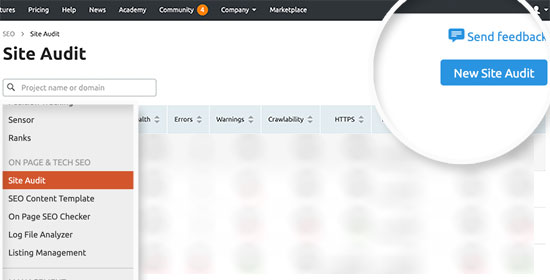
Once you are logged in, you need to click on the �Site Audit� link from the left menu.
This will bring you to the Site Audit page. From here, click on the �New Site Audit� button at the top to add your website.
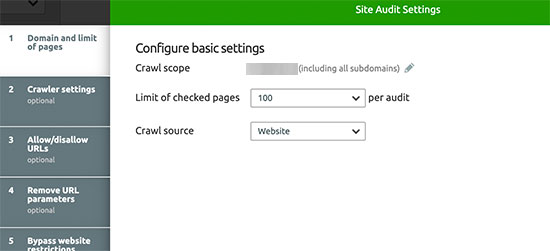
You will be asked to enter your domain name. After that, you will be asked to configure site audit settings. You can select the number of pages to crawl and choose a crawl source.
Click on the start crawling button to continue.
SEMRush will now begin crawling your website for the site audit. This may take a few minutes depending on how many pages you selected for the crawl.
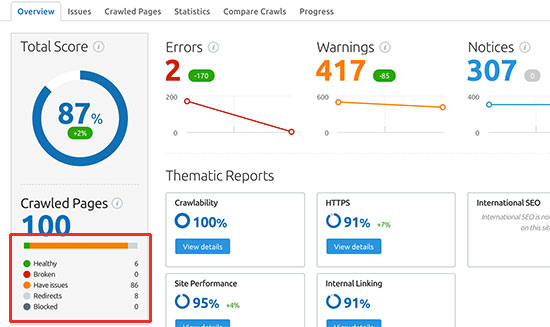
Once finished, you can click on your domain Under the Site Audit section to view your report.
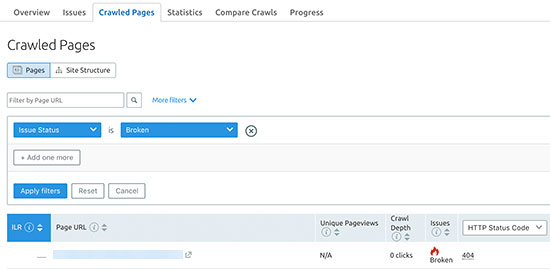
To see the broken links on your site, you will need to click on the �Broken� link under the report overview.
You can now click on the Export button at the top right corner of the screen to download your crawl report. You will need it when fixing broken links on your website (more on this later in the article).
Method 2. Finding Broken Links using Ahrefs
Ahrefs is an excellent all-in-one SEO tool for marketers, businesses, and SEO professionals. It offers detailed SEO insights into your own website or any of your competitors.
You can use it for keyword research, competition analysis, organic and paid keyword ideas, and site health monitoring including broken links.
First, you�ll need to sign up for an Ahrefs account. It is a paid service with plans starting from $99 per month. They also offer a full featured 7 day trial for $7.
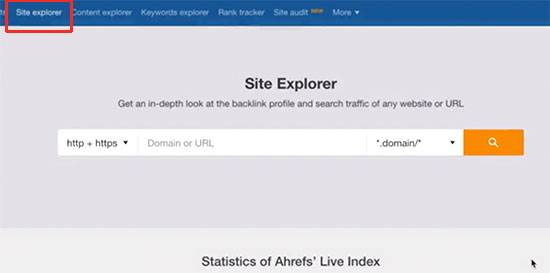
Once you are logged into your Ahref�s dashboard, you need to enter your domain name under the Site Explorer tool.
The site explorer tool will now crawl your website to prepare reports. This may take some time, depending on how much content you have on your website.
Once finished, you�ll see an overview of your site explorer results. From here, you need to click on the Pages � Best by Links menu and then sort your report by 404 status.
You can now export your report in CSV format to fix the broken links on your WordPress site.
Method 3. Finding Broken Links using MonsterInsights
MonsterInsights is the best Analytics solution for WordPress. It automatically tracks broken links or 404 errors on your website in Google Analytics.
Using the plugin, you can set up Google Analytics without editing code. It also lets you set up link and button click tracking, eCommerce tracking, form conversion tracking, author tracking, and more.
To start, you�ll need to signup for a Google Analytics account and connect it with your WordPress website using MonsterInsights. For more details, you can follow our detailed guide on how to install Google Analytics in WordPress.
Note: MonsterInsights is a premium WordPress plugin, but we�ll be using the free version for this tutorial. However, you can upgrade to its Pro version for advanced tracking features, dashboard reports, popular posts feature, and more.
Once MonsterInsights is active on your website, the plugin will start to track broken links and show you a report in Google Analytics. However, it might take up to 24 hours before you see any data in Google Analytics.
To view the report, just log in to your Google Analytics account. After that, you can go to Behavior � Site Content and click on the �Content Drilldown� report.
Next, you can enter �404.html� in the search bar, and Google Analytics will show broken links on your website.
Method 4. Finding Broken Links in WordPress using Google Search Console
Google Search Console is a free tool offered by Google to help webmasters manage their site�s visibility in search results. It also notifies you about errors, including 404 errors that are caused by a broken link.
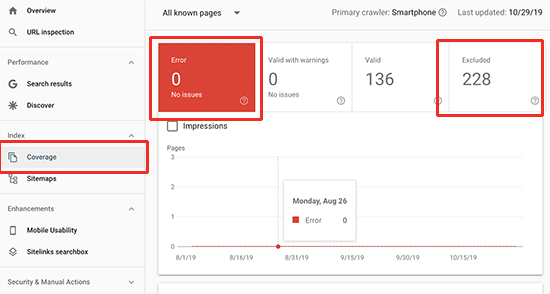
After you have logged in to your Google Search Console account, click on the �Coverage� link from the left menu.
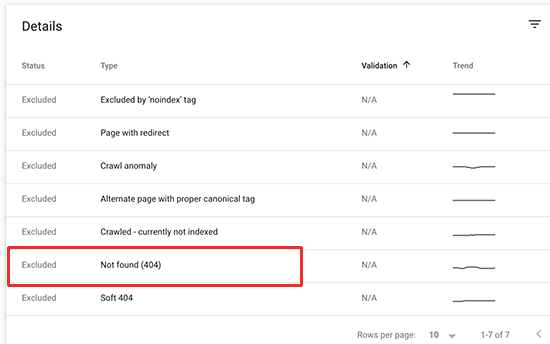
You�ll find 404 errors either under Errors or Excluded tabs. Clicking on them will show you a list of errors or issues Google encountered while visiting your website.
Clicking on the 404 error will show you all the links on your website that are broken links and return a 404 error.
You can now click on the download button to get the list of all 404 errors on your website. You�ll need this to fix broken links on your website.
Method 5. Finding Broken Links in WordPress using Broken Link Checker
For this method, we�ll be using the Broken Link Checker plugin. However, this method is not recommended because it is resource-intensive and will slow down your website. Managed WordPress hosting companies like WP Engine already block users from installing this plugin on their servers.
The plugin checks for broken links on your website, including internal and external links resulting in a 404 error.
First, you�ll need to install and activate the Broken Link Checker plugin. For more details, see our step by step guide on how to install a WordPress plugin.
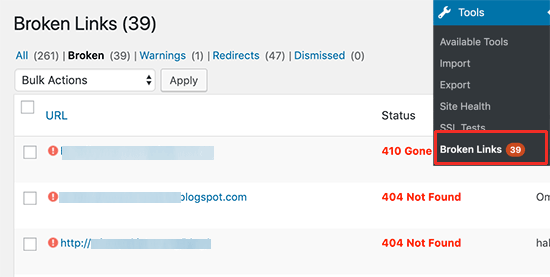
Upon activation, the plugin will start working in the background to find links in your posts, pages, and comments. You can now go to Tools � Broken Links page to view the full report.
If you have been running your WordPress blog for a long time, then this report will include broken links to third-party websites as well.
You will have to manually sort the list to find broken links on your website.
You will need to keep Broken Link Checker active on your website until you fix broken links. After that, you can deactivate the plugin because it will keep checking for broken links, which will slow down your server.
How to Properly Fix Broken Links in WordPress
We have shown you five different methods to find broken links in WordPress. Now let�s talk about how to easily fix broken links in WordPress.
The best way to fix a broken link is to redirect it to another page. For example, if you moved the contents of an article to a different address, then you will need to redirect it to the newer article.
Similarly, if an article does not exist anymore, then you would want to point users to a similar page that is closely related to the contents of the old article.
You can do this by setting up 301 redirects.
The easiest way to fix broken links and set up redirection is by using the All in One SEO (AIOSEO) plugin for WordPress. It offers a powerful redirection manager that helps you track 404 error pages and create 301 redirects.
Note: We�ll be using the AIOSEO Pro version because it includes the redirection manager addon and offers multiple types of redirections.
First, you will need to install and activate the AIOSEO Pro plugin. For more details, see our step by step guide on how to install a WordPress plugin.
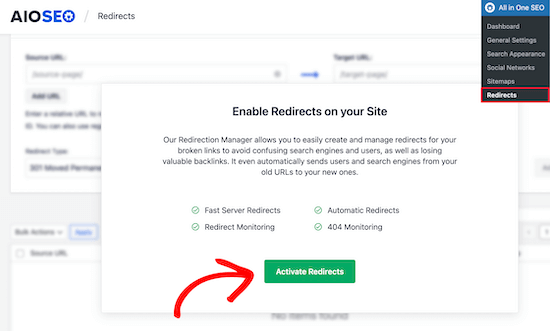
Upon activation, you need to visit All in One SEO � Redirects page and then click the �Activate Redirects� button.
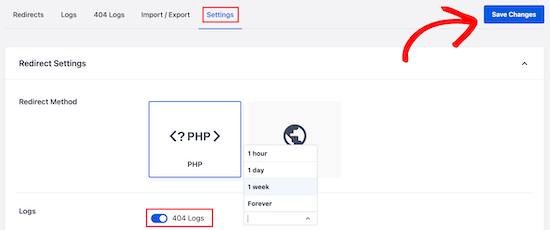
Next, you�ll need to go to the �Settings� tab under Redirects and enable 404 logs. You can find the option in the �Logs� section.
AIOSEO will also let you set the time period to record your 404 logs using the dropdown menu. We suggest that you select no longer than one month for smooth and optimal performance.
After that, go ahead and click the �Save Changes� button.
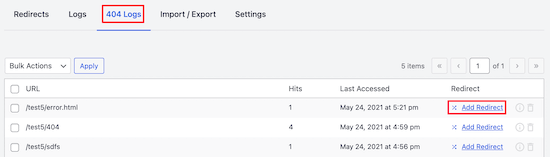
You will now see a �404 Logs� tab appear in the Redirects section in AIOSEO. Go ahead and click on the tab.
When you first enable the 404 logs option, there will be no data on this page. The plugin will only start to monitor and record 404 pages after enabling the settings.
However, once it�s active, AIOSEO will show a list of broken links on your website under the �URL� column. It will also show you how many people visited the link under the �Hits� column and the last accessed date.
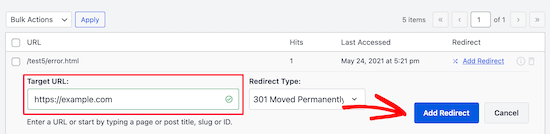
You can now click the �Add Redirect� button for any broken link you want to fix. When you click the button, you�ll see redirection options for your 404 error URL.
Simply enter the Target URL to which you�d like to redirect your visitors, select 301 Moved Permanently as the redirection type from the dropdown menu, and click the �Add Redirect� button.
You can now test this by visiting the old broken link, and you�ll be redirected to the new page.
Repeat the process for all broken links on your website.
Do you want to find keywords you can rank for in Google in the top 50 (or better) in a few days?
You can use a data-driven method called the Keyword Golden Ratio that will help you to find the low-hanging fruit among the keywords and leapfrog the competition.
In this guide, you�ll find:
What is Keyword Golden Ratio and how it works
A case study of KGR success
Why ultra long tails help you skip the Google Sandbox
How to use a keyword tool to make the process easier
Some actual examples of KGR terms
Pitfalls and Frequently Asked Questions
What is Keyword Golden Ratio?
The Keyword Golden Ratio (KGR) is a data-driven way to find keywords that are literally underserved on the internet.
If you find a Keyword Golden Ratio phrase and you publish a piece of content targeting the keyword, your article should rank in the top 50 within a few days � sometimes hours. If your site has a decent authority and isn�t brand new, then you can rank in the top 15.
The KGR is helpful for three main reasons.
New website owners need to get traffic early to stay motivated. The KGR helps newbies get small wins faster. It�s amazing to get your first few visitors and sales. Nothing is more motivating than proving your concept by getting paid.
You can prioritize what keywords and content you�ll publish on your site. If you�re staring at a list of thousands of keywords, then it�s pretty helpful to have a tool that can help you narrow down the list.
Since it�s a manual process, you have data that other people can�t just pull up on a tool in a couple of minutes. That�s a valuable advantage that rewards hard work.
By the time you finish this post, I believe you�ll be curious enough to try the KGR yourself.
KGR success story
Before I dive into the specifics, let�s review a case study to prove that Keyword Golden Ratio can work to bring in more traffic and boost revenue.
I primarily work on Amazon Affiliate sites so I can actually show earnings, not just traffic improvements.
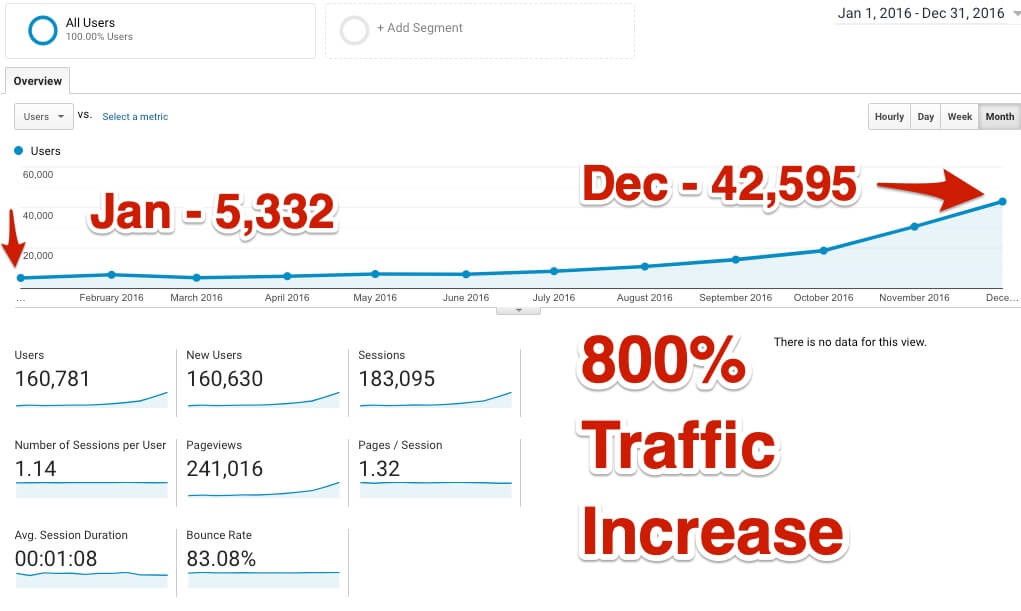
In my initial full-scale test of the Keyword Golden Ratio, I published 200 posts focused on KGR keywords over five months and the results were amazing.
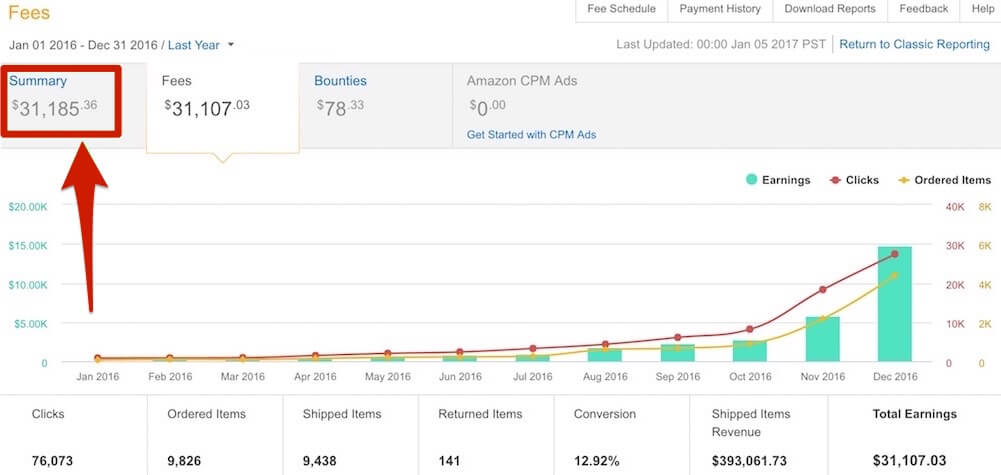
The website went from $100 to $14,853 in 12 months and the traffic increased by about 800%.
Some details about the process:
I tested the KGR with 20 posts and saw positive results so I wanted to scale up to see if I could 10x the results.
With the goal of 200 posts, I ramped up the publishing schedule slowly to keep out of pocket costs low. So in the first month, only 7 posts went live, but in the fifth month, I published over 60 posts.
The growth was gradual at first, then the traffic popped shortly after publishing all 200 posts.
No link building was done during the 12 months, but the site did have some existing links beforehand via guest posting.
The earnings followed the traffic growth and grew to close to $15,000 in December. You can read the full case study here.
Curious enough? Let�s take a look at the details!
How is Keyword Golden Ratio calculated?
The Keyword Golden Ratio is this:
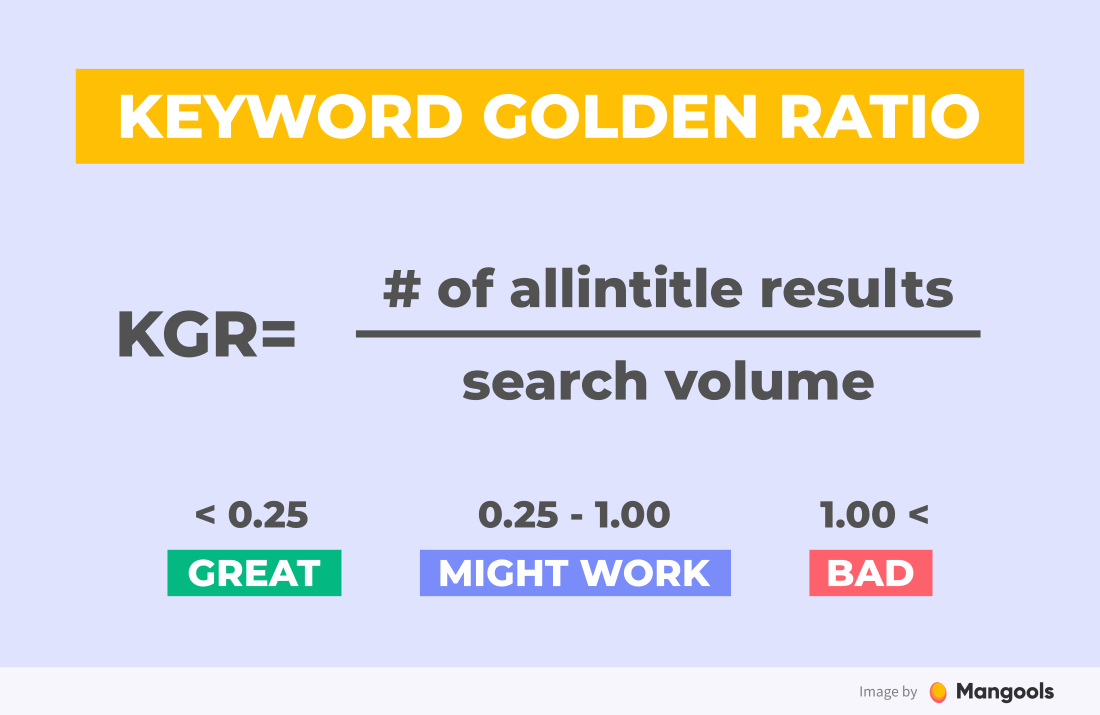
The number of Google results that have the keyword phrase in the title divided by the monthly search volume, where the search volume is less than 250.
If the KGR is less than 0.25, then you should rank in the top 50 as soon as your page is indexed.
If the KGR is between 0.25 and 1 you should rank in the top 250 and it should be pretty fast.
I strongly recommend to stick to the formula and look for KGR under 0.25 in the beginning. It is well-tested by numerous people. Later on, you can experiment with the numbers.
Details about the formula
I cap the search volume at 250 for a couple of reasons.
Lower search volume terms can rank faster in Google based on my field studies and experience of others. So all else being equal, a keyword with 250 searches will rank faster than a keyword with 2500 searches per month.
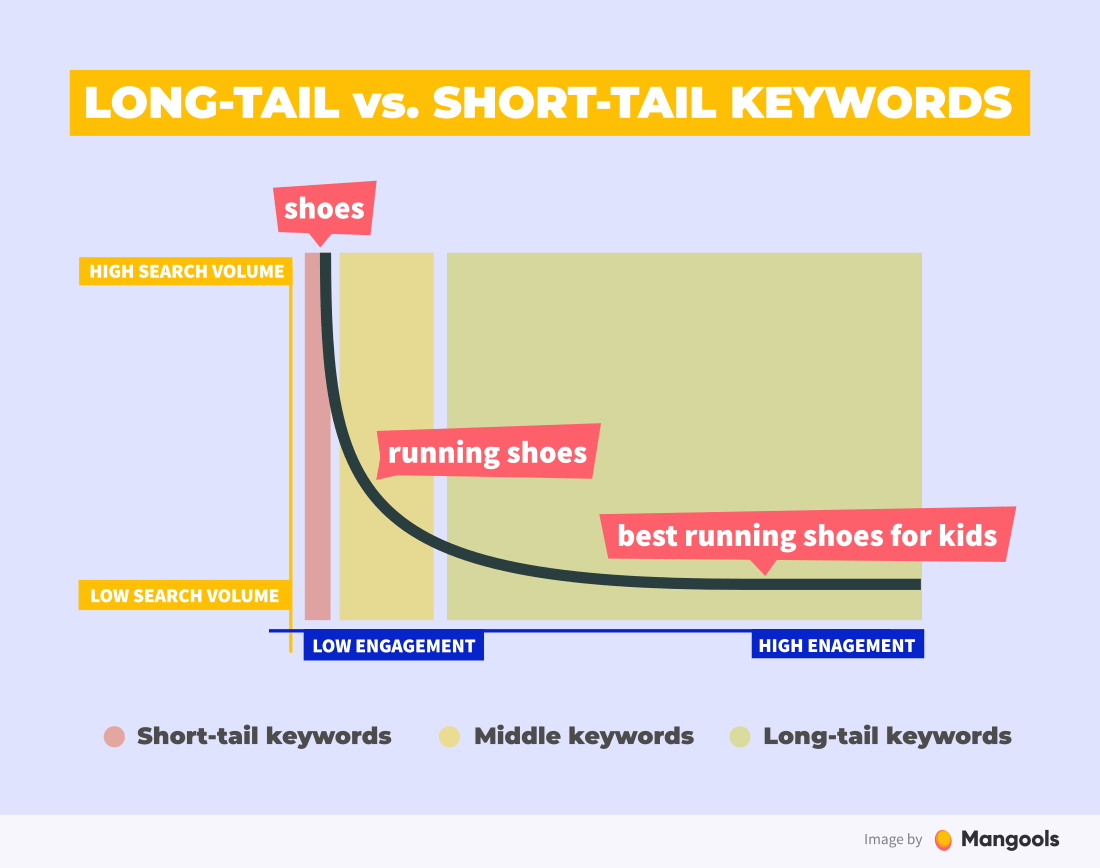
Most people target keywords with higher search volumes since there is greater profit potential. So there are more competitors in the game for the same short-tail keywords.
The sweet spot for the KGR is under 0.25. When you multiply out the formula, it�s easier to see why you can rank in the top 50 quickly.
If you have a KGR of 0.25 and a maximum search volume of 250, you end up with about 63 allintitle results. That means that there are about 63 pages on the web that are targeting that keyword phrase by using it in the title.
What is allintitle?
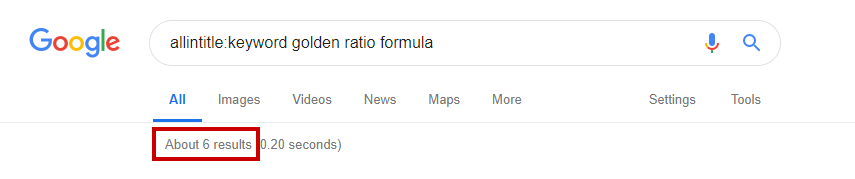
Allintitle is an advanced Google search operator that outputs the results which have all the words in the meta title of the post.
Allintitle search operator shows you the results that have all the searched words in the meta title
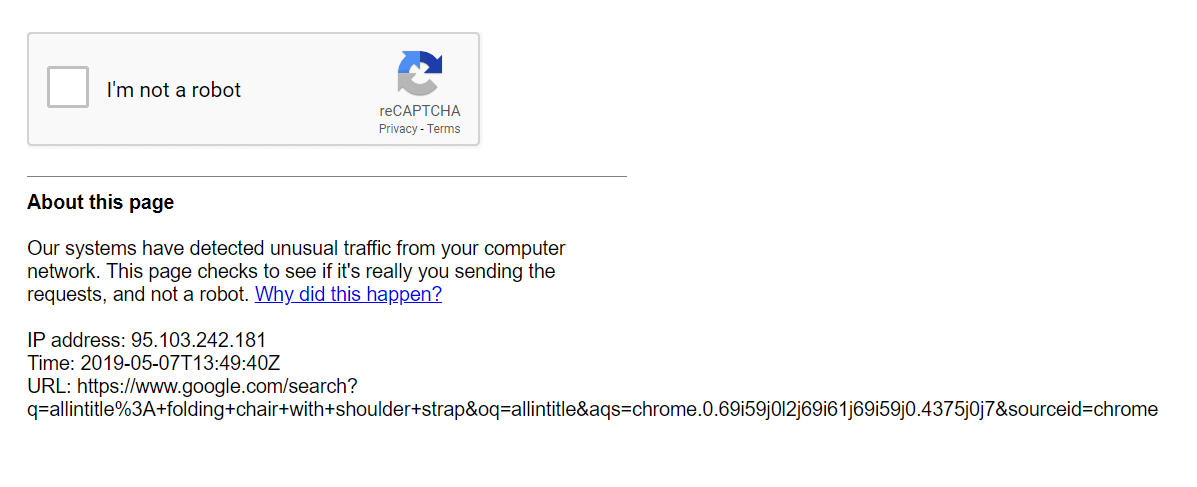
Don�t worry if Google throttles your �allintitle� search. Usually, you can only do a certain number of them in a time period. Google does this to prevent automatic scraping of the data by robots.
If you exceed the limit, you�ll have to enter a Captcha to prove you�re not a bot.
an example of a reCaptcha limitation after a certain number of allintitle searches
Ultra long-tail keywords and Google Sandbox
I assert that if you target long-tail keywords and ultra long-tail keywords, you�ll be able to get your site out of the sandbox faster.
What is the sandbox?
The Google Sandbox is the idea that it takes a while for Google to allow a new site to rank quickly. The idea has been around for years but hasn�t been confirmed to actually exist.
If you don�t get out of the sandbox sooner, you�ll at least get traffic to your site faster. I can�t prove the early exit from the sandbox since it�s not a confirmed ranking condition by Google.
But I know dozens of people that used the KGR to get traffic to their brand new sites within weeks, not months.
Does the KGR really cut the sandbox?
Effectively, yes. Yet, it�s impossible to prove since there are so many variables in play.
But another thought experiment is to think about it the other way round:
The high-volume keywords will be inherently more competitive. There will be established companies with websites ranking well.
That means they are making money and they can reinvest that money to improve the content and get links and keep the ranking.
I believe that higher search volume keywords take longer to rank even if the competition looks weak.
Maybe Google slows down the rate in which sites can rank based on the keyword search volume.
Takeaway
Go after low search volume keywords � the long tail and ultra long tail � to get traffic to your site faster.
Do you bust out of the Google Sandbox faster? It�s hard to say, but you will get traffic.
How to use a keyword tool to find KGR terms
Now I�ll show you a few real examples of keywords that fit the KGR.
We�ll use an example of a niche that has been used in several public case studies � the shaver niche. I try not to reveal anyone�s keywords or sites. It�s awesome to see that even in a niche that has public sites, lots of competition, and many copycats, there are many KGR options still available!
1. Find relevant keyword ideas
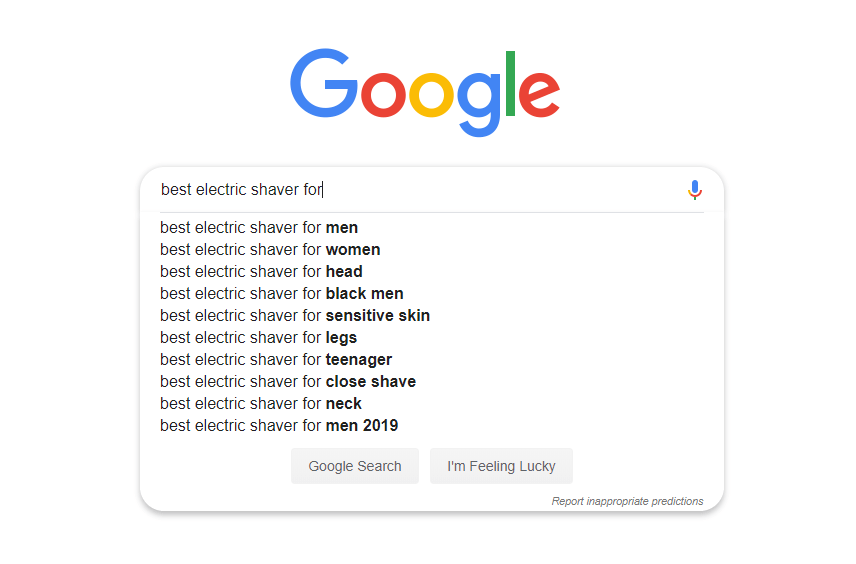
One of my favorite ways to find KGR compliant terms is to use Google Autosuggest and this format:
best(product-type) for(application or user-type)
You can do this manually and it looks like this:
But you can save a lot of time and effort by using a keyword tool such as KWFinder with advanced filtering options and the Keyword Difficulty (KD) metric.
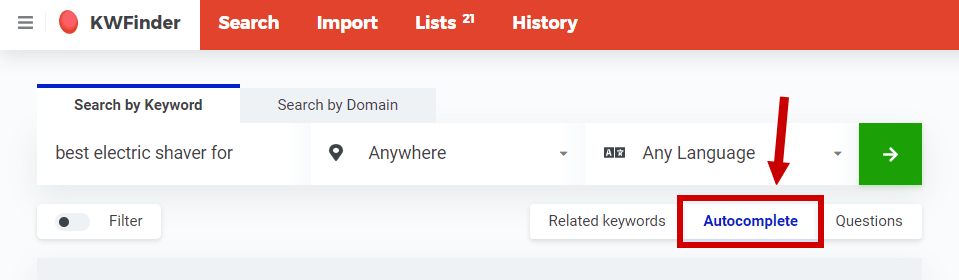
First, select Autocomplete and enter your search phrase, then click on the �Find Keywords� button:
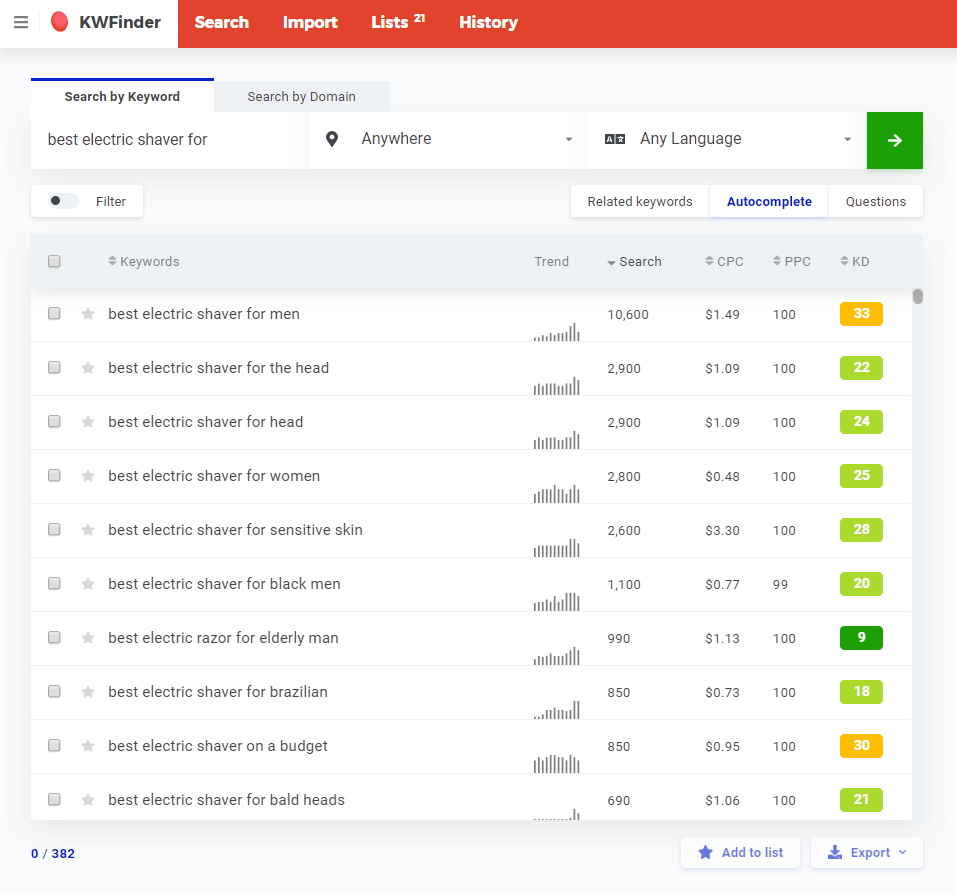
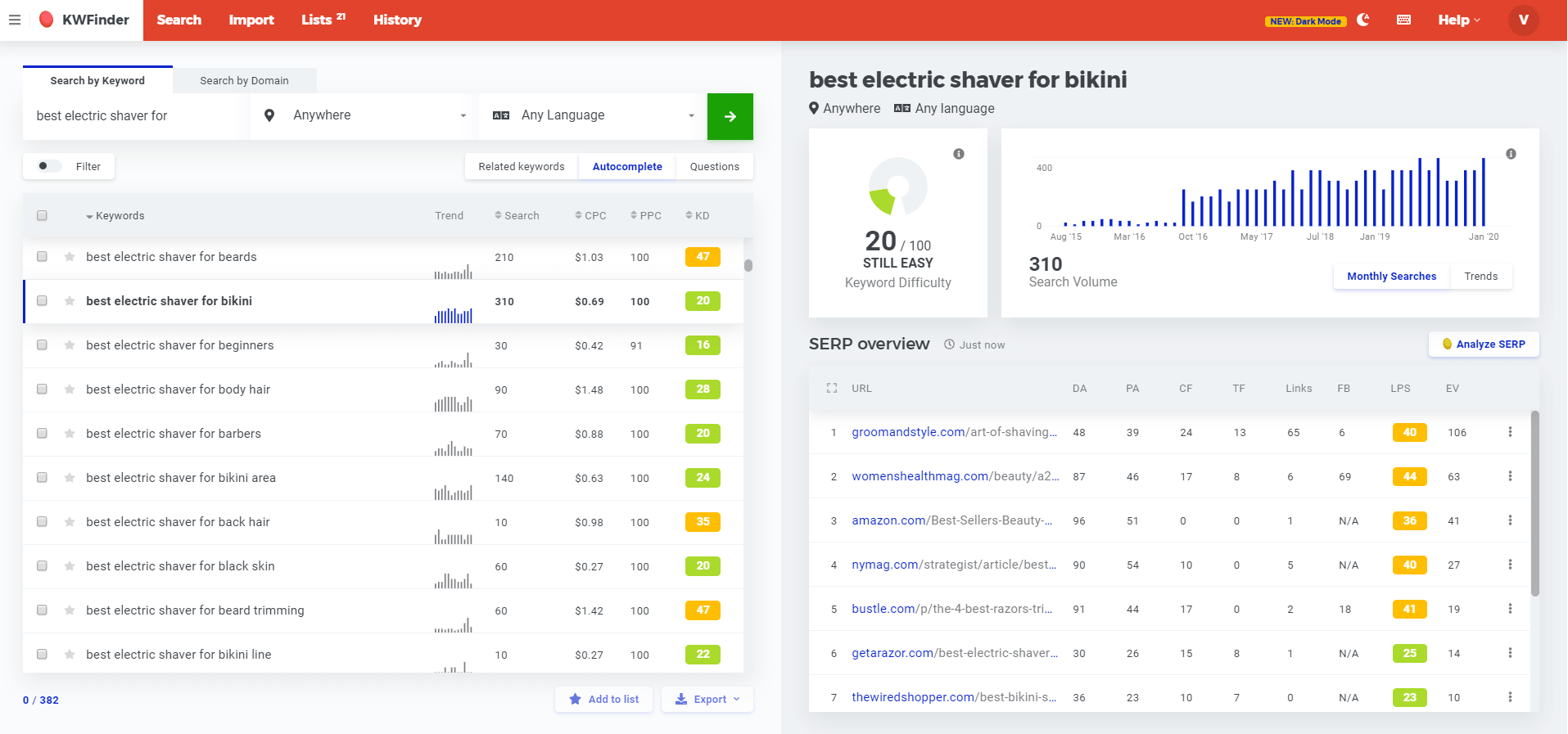
Then you�ll see the unfiltered list of results. We have quite a few, 324. We care about the Search Volume and Keyword Difficulty � the other metrics aren�t important now.
For this example, I left the geography as �Anywhere,� but you can select your target location.
2. Filter out keywords with search volume higher than 250
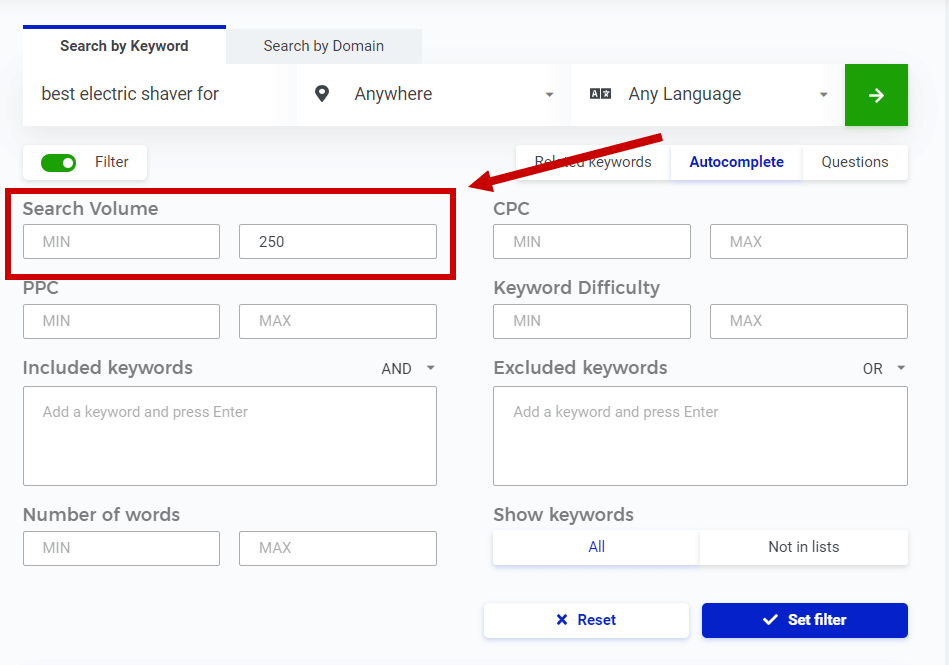
Remember the KGR requires that the search volume is under 250. That means we can set up the filter to get rid of the keywords that we don�t care about.
Enter in 250 for the MAX search volume in the filter.
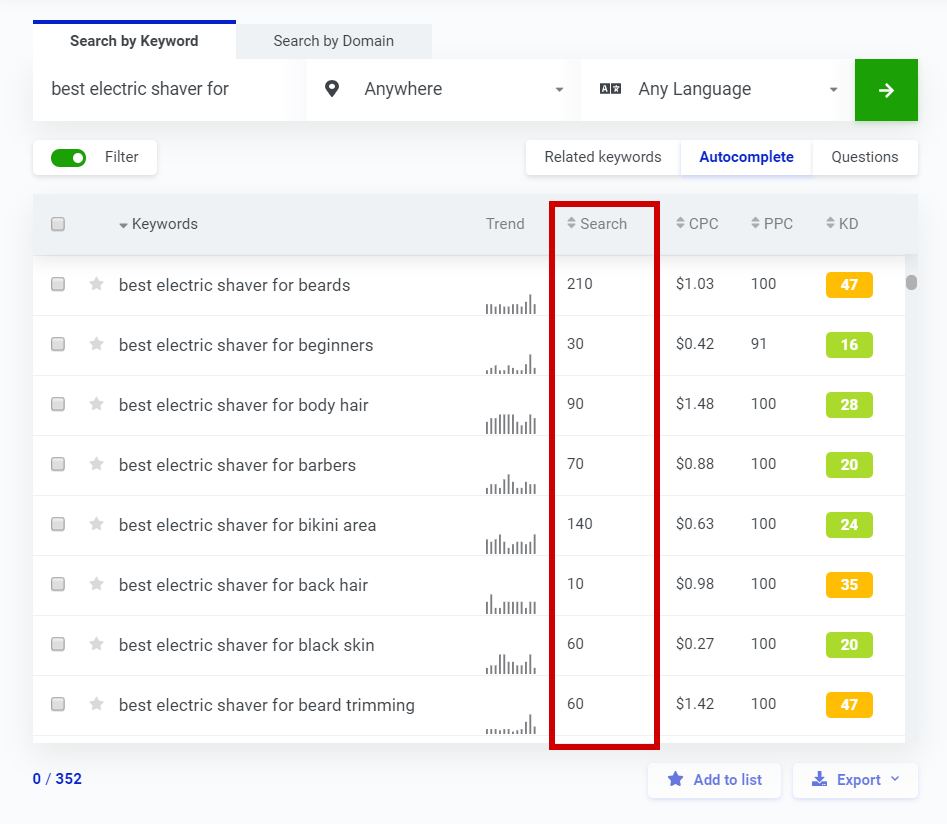
Click the blue �Set filter� button and the list is refined by removing the higher search volumes.
Now, we have plenty of options that have a search volume under 250. You could add more criteria to the filter such as a KD max of 15, 20, 25, etc�
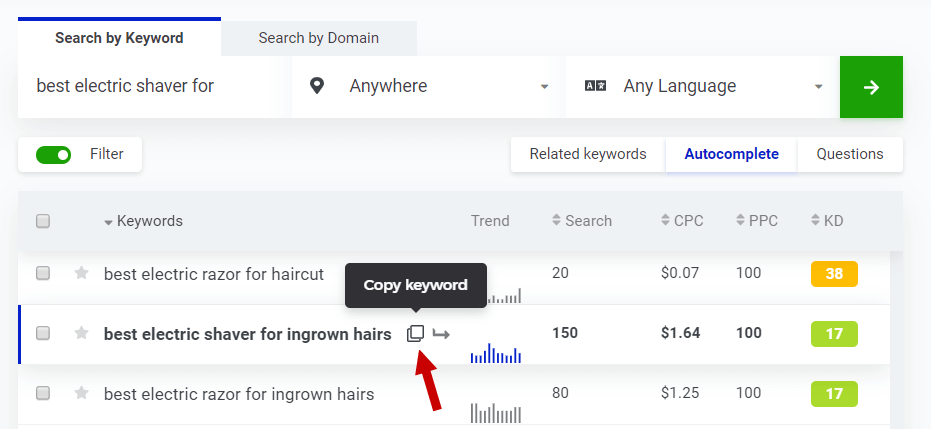
I see the results for this Autosuggest search that �best electric shaver for ingrown hairs� has a favorable KD value at 17. The search volume is 150, which fulfills the requirement to be less than 250.
You can hover over the row and click to copy the full keyword phrase to save time.
3. Find the number of websites with exact match titles
Next, you need to check the allintitle, the advanced Google Search command.
You type in allintitle: and the search phrase with no spaces and no quotes. Don�t enter the quotes because that will lower the number of results which will throw off your calculations.
Google returns the number of results which is the numerator in the KGR formula.
We see there are 22 results so we can plug that into the formula.
KGR = (allintitle results) divided by (search volume)
KGR = 22 / 150 = 0.14
Great! That�s less than 0.25 so we have a KGR compliant term.
If you prefer video content, you can check out my demo of the KGR with KWFinder:
KWFinder also has great metrics for each keyword so you can do competition analysis without leaving the app. That�s a massive time saver!
Looking at the same list, I found more keyword phrases. This is a very good thing to see.
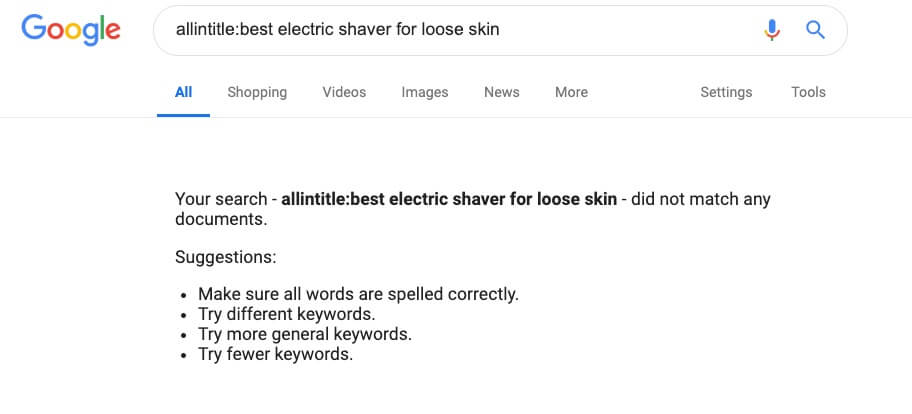
It means there are 0 allintitle results. So the KGR is 0, clearly as far below 0.25 as you can get. The search volume is 20 so we�ve found a great keyword phrase.
Here�s one last example.
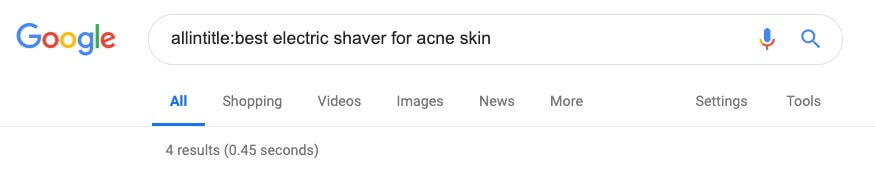
There are 4 results.
KGR = (allintitle results) divided by (search volume)
KGR = 4 / 30 = 0.13
What about non-KGR terms?
I found a term, �best electric shaver for black men�, with a low KD score of 20 which is very good.
So I checked the allintitle.
Only 50 results � that seems great, right??
KGR = (allintitle results) divided by (search volume)
KGR = 50 / 1100 = 0.045
Is this a KGR Compliant Keyword?
The answer is no. It is a fine keyword and the calculated KGR is really great. But it does not fulfill the criterium of search volume less than 250. However, part of the magic of the KGR is the ability to rank in Google quickly.
I believe one of the factors is the search volume so having a higher search volume will have an impact on ranking quickly. I�ll go deeper on this very topic in the FAQ section and there are exceptions to the rule.
Use my personal spreadsheet to check �allintitle� faster
You can see it�s cumbersome to click back and forth from KWFinder to Google, copy, paste, and all that.
To help you, I created a spreadsheet to help you do this faster.
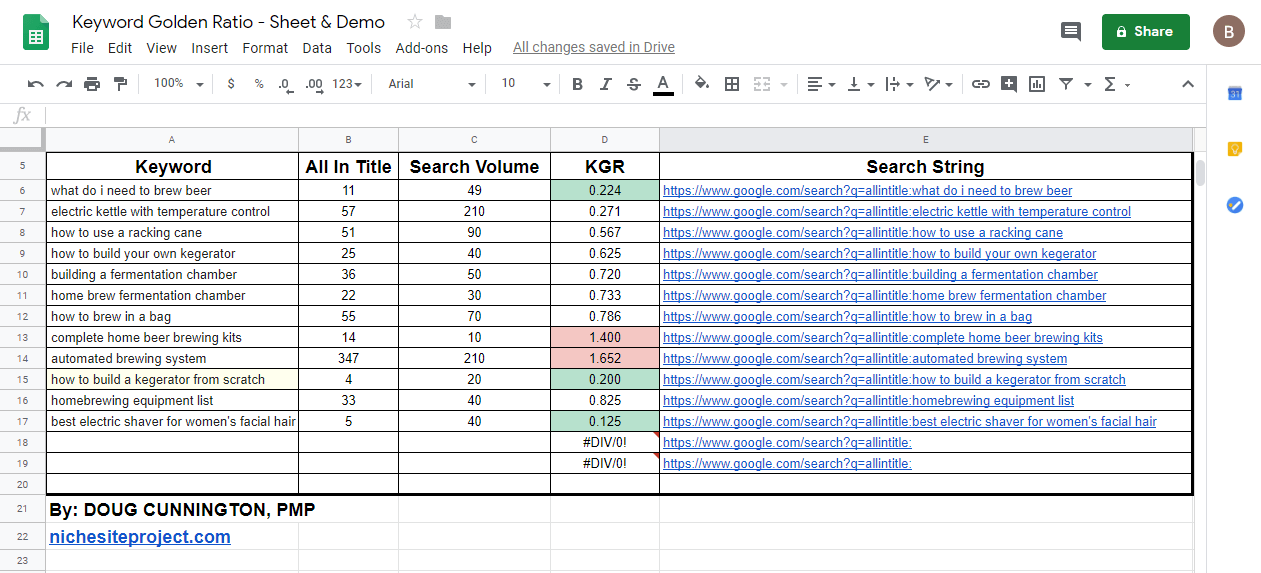
You can fill in the list of keywords and search volume from KWFinder. Then, the column is auto-populated with a hyperlink that contains the allintitle plus the keyword for you.
After you fill in the number allintitle results, the KGR is automatically calculated. The cell will turn green, yellow, or red based on the KGR value.
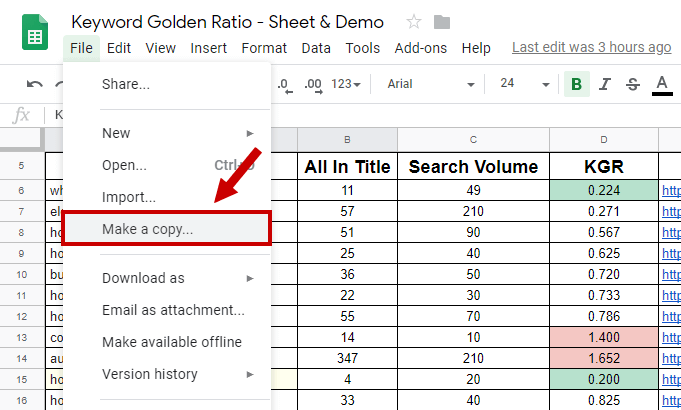
Don�t forget to make your own copy so you can edit the spreadsheet.
Keyword Difficulty vs. the Keyword Golden Ratio � which is better?
Both Keyword Difficulty and Keyword Golden Ratio are ways to help you find keywords you can rank for easily. So you may ask � which one is better?
The thing is that you don�t have to choose between the two because the KD and KGR can both be correct. They look at different factors to gauge the competition for a given keyword.
At the core, here is the difference:
The KD metric from KWFinder is based on the Link Profile Strength (LPS) of the web pages that are currently ranking, while the KGR is based on sites that have the keyword in the title.
So KD takes mainly the following into account:
Domain Authority and Page Authority from MOZ
Citation Flow and Trust Flow from Majestic
The KGR helps us see if a webmaster is specifically targeting the keyword phrase or not. If the webmaster doesn�t put the phrase in the title, then it�s safe to assume they aren�t intentionally targeting the keyword.
Both are useful metrics in gauging the competition even though they come at the solution from different directions.
If you have a keyword phrase that is KGR compliant with a low KD metric, then you probably found a gem of a keyword.
If your keyword phrase has poor KGR and KD metrics, it�s probably a tough keyword phrase to rank.
Pitfalls with the KGR
The KGR is a fantastic tool and can help you get traffic fast. But it�s not all rainbows and gummy worms. Here are a few things to consider and remember about the Keyword Golden Ratio.
Keyword stuffing
Avoid keyword stuffing. Don�t use the keyword phrase too often in the content. Usually, KGR terms will be longer than normal keyword phrases, sometimes 4 or more words.
Longer phrases shouldn�t be used very often in the text. It would be really weird and unnatural to use a long keyword phrase 8 times in a post.
For example, it would look weird if you used �best ballpoint pen for journaling� more than a couple of times.
My rule of thumb is to use a KGR phrase once in the title, then once in the main content. You can use other partial match keywords and related phrases as normal.
That�s it. Don�t overdo it.
Pro tip: People often follow the keyword density suggestions from Yoast SEO plugin. However, it may suggest using the keyword way too many times. Don�t forget that it�s just a tool created for an average content creator. You aren�t average � the Keyword Golden Ratio is an advanced technique.
Keywords that may not rank
Sometimes a KGR term isn�t going to rank well, even if all the metrics tell you it�s a good keyword.
Why is that?
Google has figured out what the end user, the searcher, is interested in.
For example, let�s say you have an affiliate site so you want to see a few similar sites on the first page of the search results.
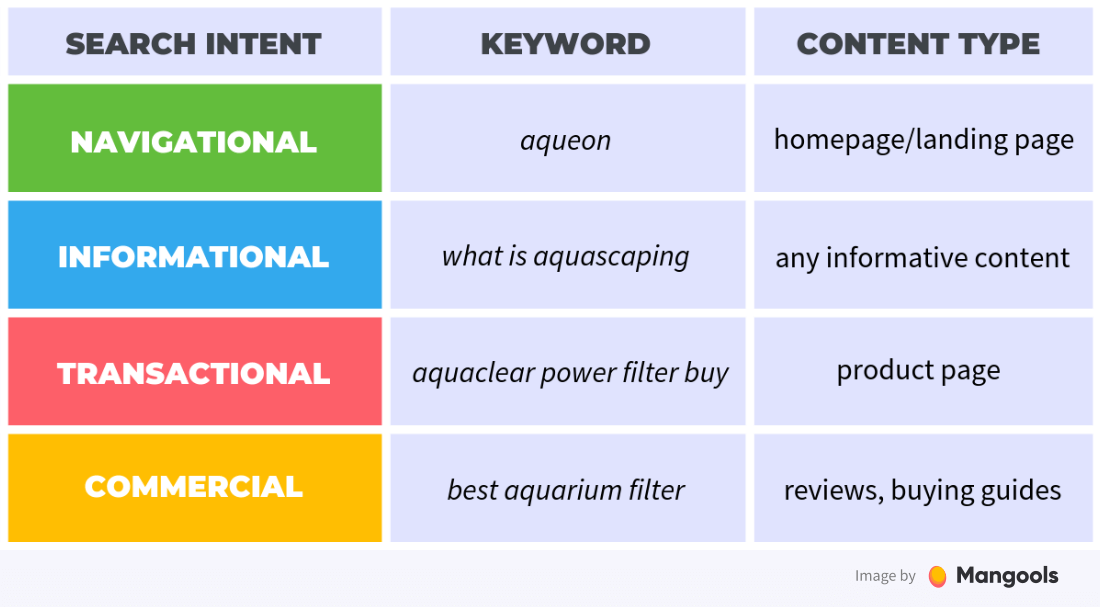
If you find a KGR term, then you should Google the term before you write and publish the content. Check out the results to see what Google is delivering to the searcher � what is the user�s search intent.
If you see mostly e-commerce sites in the results, then searchers tend to like those results better than affiliate sites.
If you see YouTube videos in the majority of the results, that means searchers want to see a video.
If the term happens to be medical or health related, then you�re likely to see big authoritative sites like Mayo Clinic, WebMD, medical journals, and other sites with a huge amount of trust in the medical field.
The takeaway is that Google tells you what sites are ranking in the search results. All you have to do is look carefully.
If you don�t see any sites that are similar to yours, then that�s a bad sign � a sign that even a KGR with great metrics is likely not going to rank.
Difficulty finding KGR complaint terms
Finding keywords is a skill, and it�s one that you can get better at. So, finding KGR terms is going to be hard at first.
Using tools like KWFinder can make it much easier, of course, but it comes down to putting the time in.
Part of the magic of the KGR is that you cannot just buy a tool that will do it. You have to look for the keywords manually.
Trying only one KGR compliant post
The KGR works really well at scale. I suggest you try 20 KGR terms to test out your site.
I�ve found that about 5% of KGR terms perform better than expected, 15% worse than expected, and 80% rank somewhere in the top 30 � 50 results.
The 80% tend to move higher in rankings over time depending on the quality of the content, your site�s authority, and the relative competition.
So if you only publish one KGR compliant post, it may not rank. You might think it�s a failure. But if you publish enough posts to give it a fair try, you�ll see the magic.
FAQs about the Keyword Golden Ratio
Can I automate finding KGR terms? Is there a tool that will do it for me?
No, not any tool I know of. The Captcha introduces an issue for developers looking to automate this.
Configuring the app would be cumbersome so support for such an app would kill the margins to make it profitable. Go for it if you�re interested!
What if keyword research tools have different search volumes?
Pick one tool and stick with it. All keyword search volumes are estimates � even if you get them directly from Google.
All keyword research tools use different algorithms to generate search volume estimates. So the exact search volume doesn�t really matter too much.
What is important is the relative volume compared to other keywords, i.e. keyword X gets 3 times more searches than keyword Y.
The Keyword Golden Ratio can perform in spite of the inexact nature of keyword search volumes.
I found a term with a KGR under 0.25, but the search volume is over 250.
Go for it. Technically, this is not a KGR term based on the definition, like the example above.
However, you have found a keyword with a smaller amount of competition so that�s a good thing.
You may not rank as quickly or at all, but that goes for just about any keyword where you aren�t looking at the competition levels.
There are 2 main things that you need to think about:
Let�s say the search volume for the term you found is 10,000. If the KGR is 0.25, that means that you have 2,500 other sites that have the keyword phrase in the title and probably intentionally targeting that keyword.
With the strict KGR definition of targeting KGR values under 0.25 and a search volume of under 250, you�re only competing with a maximum of 62.5.
So there is way more competition and it�s simple math to see that.
I contend that higher search volume keywords take longer to rank for than low search volumes regardless of the competition numbers.
Are there exceptions for the KGR?
If your site isn�t brand new and has some authority via solid backlinks, then you can use the KGR as a guide, not a strict rule.
You can be a bit looser with the formula and go for search volumes that are higher, like 1,000 searches per month. Or, go for KGR values up to .8 or 1.5 � it�s up to you to test to see how your site will be treated.
Conclusion
The Keyword Golden Ratio is one of the best SEO techniques for beginners. It can change the way you look at long-tail keywords so that you can be confident that your content will get the attention it deserves.
It takes skill and effort to find KGR terms, but it�s worthwhile and can help separate you from your competition.
If you�re starting a brand new site, the KGR can help you get traffic to your site before it is out of the Google sandbox.
Domain expired adalah domain yang masa aktifnya tidak diperpanjang lagi oleh pemilik sebelumnya sehingga bisa kita registrasi ulang.
Lalu, kenapa kita harus mencari domain expired ?
Bukankah domain baru lebih baik karena kita bisa memilih nama domain sesuai keinginan kita ?
Well, membeli domain baru adalah sesuatu yang umum dan banyak dilakukan oleh internet marketer, entah itu untuk website pribadi, perusahaan atau moneysite (web utama untuk mendapatkan earning). Tapi dalam beberapa kasus (terutama untuk internet marketer yang berkecimpung di bidang SEO), membeli domain expired bisa jadi satu pilihan yang mempunyai keuntungan tersendiri dibanding dengan membeli domain baru.
Apakah keuntungan itu ? Utamanya adalah untuk mem-bypass authority yang umumnya dipunyai oleh domain-domain expired, yang tentunya tidak dimiliki oleh domain yang masih baru. Sehingga nantinya, website bisa lebih mudah dan cepat meranking di search engine.
3 Fungsi Utama Domain Expired :
� Sebagai Moneysite
Dengan authority yang dipunyainya, domain expired bisa dijadikan moneysite yang potensial.
� Sebagai PBN
Domain expired juga bisa dijadikan PBN (Private Blog Network) yang kuat untuk mendongkrak ranking web-web moneysite di search engine.
� Sebagai 301 Redirects
Terakhir, domain expired bisa digunakan untuk mem-bypass linkjuice ke domain baru dengan teknik 301 redirect (tidak direkomendasikan untuk pemula, use at your own risk).
Tahapan Domain Setelah Expired
Sebelum melangkah lebih jauh, ada beberapa hal yang harus Anda ketahui tentang domain expired.
Setelah domain menjadi expired, ada beberapa tahapan yang harus dilalui. Untuk tiap registrar (Godaddy, Namecheap, Dynadot, dan sebagainya) tahapan ini bisa berbeda-beda waktunya.
Berikut ini tahapan-tahapan domain dari pertama expired sampai domain dilelang atau di delete dari registrar. Dalam tahapan ini saya menggunakan Godaddy sebagai acuan, untuk registrar lain bisa saja periode waktunya berbeda.
Hari setelah domain expired
Keterangan
Hari ke-1
Domain dalam status Grace Period. Godaddy mencoba melakukan tagihan dan renew otomatis (jika diakun pemilik domain disetting auto-renew) untuk memperpanjang masa aktif domain
Hari ke-5
Godaddy mencoba melakukan tagihan dan renew otomatis untuk kedua kalinya. Jika masih tetap gagal, domain akan langsung dimasukkan ke domain parking. Dalam tahapan ini, pemilik domain masih bisa memperpanjang domain tanpa kena biaya denda
Hari ke-12
Godaddy mencoba melakukan renew otomatis untuk ketiga kalinya atau yang terakhir. Dalam tahapan ini, pemilik domain juga masih bisa memperpanjang domain tanpa kena biaya denda
Hari ke-19
Domain bisa diperpanjang pemilik domain dengan biaya denda $80.00
Hari ke-26
Domain dimasukkan kedalam lelang di Godaddy (https://auctions.godaddy.com) dengan sistem BID
Hari ke-36
Lelang domain berakhir. Jika domain masih belum laku, domain akan dimasukkan ke lelang closeout (closeout auction). Didalam closeout auction ini berlaku sistem BIN (Buy it Now)
Hari ke-41
Closeout auction berakhir
Hari ke-42
Kesempatan terakhir untuk pemilik lama me-renew domain. Jika pemilik lama me-renew domain pada tahap ini, maka biaya yang dikeluarkan pemenang lelang/closeout akan direfund
Hari ke-43
Domain diserahkan ke pemenang lelang/ closeout. Jika sampai tahap ini domain tidak juga laku (tidak ada yang melakukan BID atau BIN) maka domain akan diserahkan ke registry
Hari ke-44
Domain kembali ke registry dan dalam status Redemption Period selama 30 hari. Dalam tahapan ini domain hanya bisa diperpanjang oleh pemilik lama, tentunya dengan biaya denda
Hari ke-74
Domain dalam status Pending Delete selama 5 hari. Dalam tahapan ini domain sudah tidak bisa lagi diperpanjang oleh pemilik lama
Hari ke-79
Domain berstatus Deleted. Domain dirilis ulang ke publik dan bisa dibeli seperti domain baru. Umur domain juga di set kembali ke 0
Aged Domain vs Dropped Domain
Mungkin Anda sering mendengar istilah aged domain dan dropped domain, terutama jika Anda tertarik dengan metode linkbuilding via PBN.
Lalu apa perbedaan antara aged domain dan dropped domain ? Manakah yang lebih bagus diantara kedua jenis expired domain tersebut ?
Aged domain dan dropped domain memiliki kekurangan dan kelebihan masing-masing. Tapi untuk membantu Anda membedakan dan memilih mana yang lebih cocok untuk Anda, saya berikan sedikit penjelasan tentang perbedaannya.
Dari tabel diatas, aged domain adalah jika Anda membeli expired domain dengan sistem lelang diantara hari ke-26 sampai dengan hari ke-41. Kenapa ? Karena Anda me-renew (memperpanjang masa aktif) domain sebelum domain dikembalikan ke registry.
Sedangkan expired domain masuk kategori dropped domain jika Anda melakukan renew (lebih tepatnya membeli) domain setelah hari ke-79. Kenapa ? Karena Anda membeli setelah domain dikembalikan ke registry dan umur domain di set kembali ke 0.
Kelebihan aged domain : � Bisa dibedakan antara domain deindex dengan yang masih terindex � Umur domain tidak direset ke 0
Kekurangan aged domain: � Harga lebih mahal karena membayar biaya domain + renew � Kurang fleksibel dalam memilih nama domain, karena menyesuaikan dengan stok yang ada di lelang/auction.
Kelebihan dropped domain : � Harga lebih murah karena sama seperti membeli domain baru � Lebih fleksibel dalam memilih nama domain karena stok melimpah
Kekurangan dropped domain : � Susah dibedakan antara deindex atau tidak, karena hampir semua dropped domain indexnya kembali 0 � Umur domain direset kembali ke 0
Aged domain dan dropped domain mempunyai kekurangan dan kelebihan masing-masing, jika Anda ingin mencari expired domain entah untuk Moneysite ataupun PBN, sesuaikan saja dengan budget dan kebutuhan.
Website yang menyediakan daftar/list domain expired
Setelah mengetahui fungsi dan perbedaan domain expired, Anda juga tentunya ingin tahu dimana bisa mendapatkan daftar domain-domain expired tersebut. Berikut ini list-nya :
Service premium yang bisa dibilang paling lengkap dalam menyajikan list database domain expired.
Dua service diatas adalah yang paling sering saya pakai dalam mencari expired domain. Jika Anda masih dalam tahap coba-coba, silahkan gunakan expireddomains.net (free). Jika Anda sudah dalam tahap serius membangun PBN misalnya, Anda bisa subscribe di Domcop.com.
Selain dua service diatas, masih banyak website-website lain yang menyediakan list database domain-domain expired dari berbagai registrar. Website-website tersebut antara lain :
Selain itu, hal yang harus Anda ketahui sebelum mencari domain expired adalah menganalisa metrik dari domain-domain tersebut apakah layak untuk dijadikan Moneysite/PBN atau tidak.
Perlu diingat, metrik-metrik atau kriteria dibawah ini hanya sebagai sebuah panduan, bukan acuan yang harus diterima dan diterapkan secara mutlak. Bahkan, tiap praktisi SEO bisa berbeda-beda dalam menentukan batasan-batasan yang ada. Apalagi, mayoritas dari metrik ini bukanlah resmi buatan Google atau search engine lain, jadi tidak ada jaminan hasilnya 100% sesuai atau mendekati dengan algoritma yang ada.
DA/PA
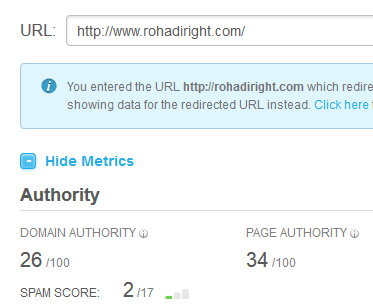
DA (Domain Authority) dan PA (Page Authority) adalah metrik yang dikembangkan oleh Moz.
Nilai DA & PA sebuah domain bervariasi antara 0 s/d 100. Semakin tinggi DA/PA sebuah domain, makin tinggi pula authority domain tersebut (menurut Moz). Hal ini tidak sepenuhnya salah, tapi juga tidak sepenuhnya benar.
DA/PA sangat dipengaruhi oleh link yang masuk ke sebuah domain, terlepas dari kualitas link tersebut. Hal ini yang membuatnya mudah untuk dimanipulasi.
Tiap praktisi SEO bisa berbeda-beda dalam menentukan DA/PA minimal sebuah expired domain yang layak untuk dibeli. Ada yang minimal 10, 15, 20 bahkan ada yang minimal diatas 30.
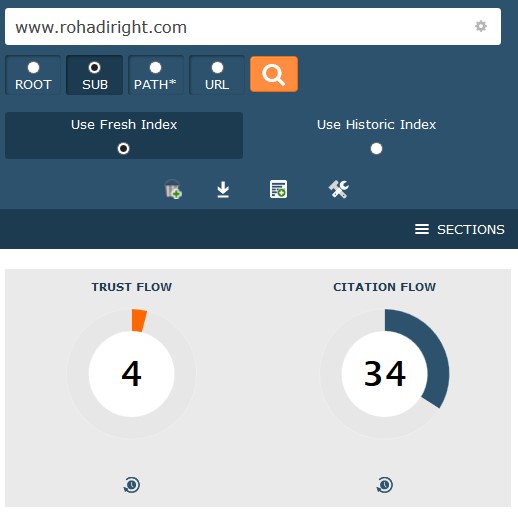
TF (Trust flow) dan CF (Citation Flow) adalah metriks yang dikembangkan oleh Majestic.
Berbeda dengan DA/PA, TF/CF tidak hanya fokus pada backlink yang masuk ke sebuah domain, tapi juga kualitas dari backlink tersebut.
Nilai TF (Trust flow) sebuah domain dipengaruhi oleh authority dari website-website yang memberikan backlink, sedangkan nilai CF (Citation Flow) dipengaruhi oleh banyaknya mention yang diterima sebuah domain di internet (world wide web) terlepas dari adanya backlink atau tidak yang mengarah ke domain tersebut.
Nilai TF/CF juga bervariasi mulai dari yang terendah (0) sampai tertinggi (100).
Idealnya, semakin tinggi nilai TF semakin besar pula kualitas domain tersebut.
blog ini mempunyai nilai Trust Flow yang mengenaskan� >_<
Tapi tidak halnya dengan CF. CF yang terlalu tinggi seringkali mengindasikan bahwa domain tersebut bekas dipakai spamming, apalagi jika tidak diimbangi dengan nilai TF yang seimbang.
Idealnya, nilai CF tidak lebih dari 2x-nya nilai TF.
Jika nilai TF 22 misalnya, nilai CF yang bagus adalah 44 kebawah.
Untuk mengecek TF/CF sebuah domain, Anda bisa langsung ke website https://majestic.com/
Index
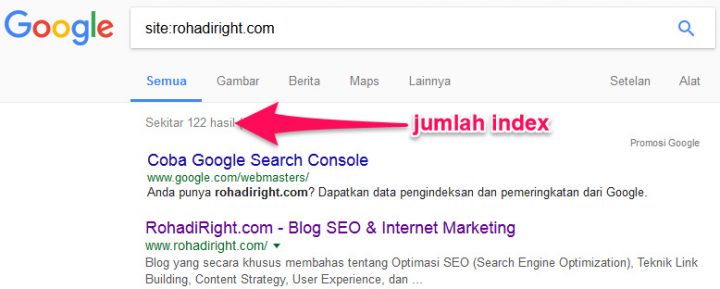
Jika Anda memilih aged domain maka domain harus masih terindeks di Google.
Anda bisa cek di Google dengan mengetikkan �site:namadomain.com� (tanpa tanda kutip)
Untuk jenis dropped domain tidak diperlukan pengecekan indeks, karena 99% indeks-nya sudah dihapus oleh Google.
Umur Domain
Untuk jenis aged domain rata-rata praktisi SEO menyarankan umur domain setidaknya 2 tahun.
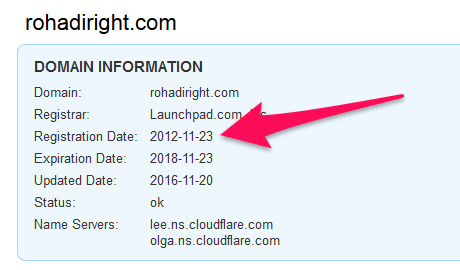
Untuk mengecek umur domain Anda bisa menggunakan whois checker seperti :
Umur domain dihitung mulai dari pertama domain didaftarkan (Registration Date) sampai waktu sekarang.
Untuk jenis dropped domain Anda tidak perlu menggunakan patokan umur domain.
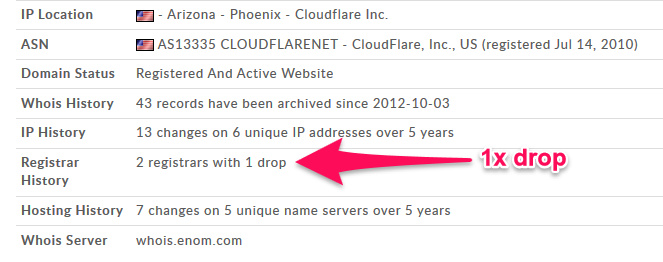
Drop tidak lebih dari 2x
Ini juga banyak disarankan oleh para praktisi SEO.
Saya pribadi tidak menganggap poin ini terlalu penting. Anda bisa berimprovisasi dan melakukan trial error sendiri untuk menemukan jumlah minimal/maksimal berapa kali drop yang menurut Anda sesuai.
Untuk melihat berapa kali sebuah domain mengalami drop Anda bisa cek di whois.domaintools.com :
Backlink
Ini adalah yang salah satu poin yang paling krusial dalam menentukan bagus tidaknya sebuah expired domain.
Backlink berperan besar dalam menentukan performa sebuah expired domain kedepannya, entah itu untuk moneysite atau PBN.
Beberapa hal yang harus Anda perhatikan dalam melakukan pengecekan backlink :
Perbandingan antara referring domain dengan total backlink yang wajar
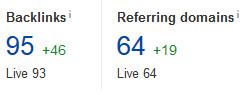
Jika sebuah domain mempunyai total backlink 153 dan backlink tersebut berasal dari 40 domain, ini adalah sebuah angka yang wajar. Akan tetapi jika domain mempunyai total backlink 1500-an dan berasal hanya dari 30-an domain, ini menjadi sebuah tanda-tanya besar.
Total backlink yang banyak dengan referring domain yang terlalu sedikit biasanya mengindikasikan bahwa backlink banyak terpasang secara sitewide, entah itu di sidebar atau footer. Dan seperti yang sudah diketahui, backlink sitewide di sidebar/footer tidak terlalu bagus untuk website, apalagi jika niche/topik-nya tidak relevan.
Idealnya, jumlah total backlink tidak lebih dari 10x jumlah referring domain.
Misal, jumlah referring domain 13, maka jumlah maksimal total backlink tidak lebih dari 130.
Jika jumlah referring domain 50, maka jumlah maksimal total backlink tidak lebih dari 500. Dan seterusnya�
Apakah itu berarti total backlink yang banyak dengan referring domain yang terlalu sedikit pasti spam dan harus kita hindari ??
Belum tentu.
Sekali lagi ini hanya panduan yang tidak harus Anda terapkan sama persis.
Jika Anda menemukan domain dengan total backlink yang banyak dan referring domain yang terlalu sedikit, Anda harus melakukan langkah pengecekan backlink selanjutnya yaitu�.
Cek backlink satu persatu
Backlink yang bagus atau jelek tidak ditentukan oleh kuantitasnya, tapi kualitasnya. Untuk itu Anda harus melakukan pengecekan satu persatu untuk menentukan kualitas dari backlink tersebut.
Apakah tidak melelahkan melakukan cek backlink satu persatu ??
Bagaimana jika backlinknya ada ratusan, atau ribuan ??
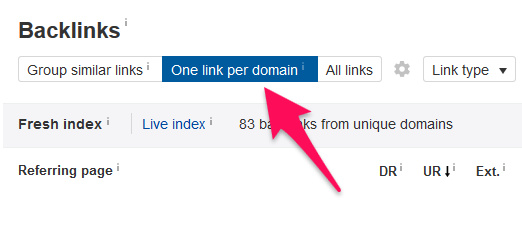
Well, Anda bisa menggunakan fitur dari backlink checker seperti Ahrefs untuk menampilkan hanya 1 link per domain.
Misal, sebuah domain mempunyai backlink sebanyak 800. Tapi 800-an backlink tersebut berasal dari 83 referring domain.
Dengan Ahrefs, Anda bisa menampilkan hanya 83-an backlink yang diambil dari 83 referring domain tersebut. Jadi tiap referring domain ditampilkan hanya 1 sample backlink-nya saja.
Authority Backlink vs Clean Backlink
Banyak yang menyarankan bahwasannya untuk mendapatkan domain exired yang berkualitas Anda harus mencari domain yang mendapat backlink dari authority sites seperti Huffington Post, Wikipedia, Masable, Engadget, web-web pendidikan (.edu) atau web-web pemerintahan (.gov).
Saran ini ada benarnya, walaupun menurut saya tidak 100% benar.
Jika domain expired yang Anda analisa mendapat backlink dari web-web Authority seperti diatas maka itu adalah sebuah poin plus, tapi jika tidak tidak perlu berkecil hati.
Expired domain tidak wajib mempunyai backlink authority untuk bisa dijadikan Moneysite/PBN yang potensial, yang paling penting menurut saya adalah clean backlink alias backlinknya bebas dari spam.
Contextual Links
Expired domain yang bagus menurut saya adalah yang mayoritas backlinknya berupa contextual links atau berada didalam artikel.
Alasannya ? Backlink yang berada didalam artikel besar kemungkinan relevan dengan isi artikel, sehingga kecil kemungkinan terindikasi sebagai spam.
Anchor text
Anchor text juga tidak kalah pentingnya.
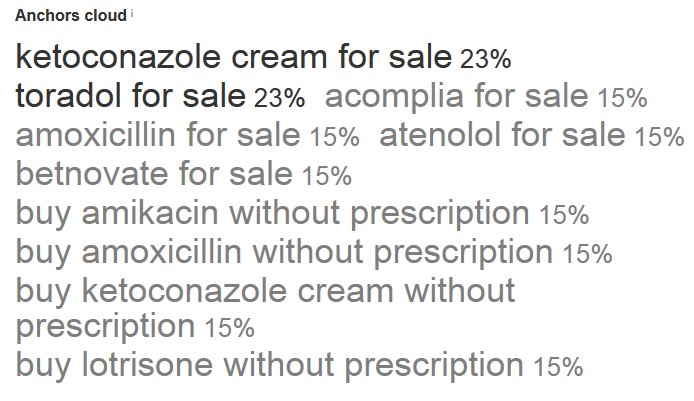
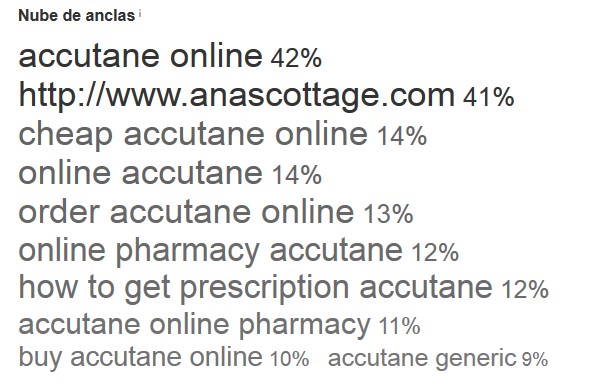
Domain expired dengan backlink-backlink dari web authority akan jadi sia-sia jika anchor text nya seperti ini :
Seiring dengan makin seringnya Anda menganalisa dan mencari expired domain yang bagus, nantinya Anda akan makin terbiasa dan bisa membedakan antara anchor text spammy dan legit hanya dengan melihatnya secara sekilas.
Anchor text yang bagus adalah yang banyak memakai nama atau brand domain.
Sebaliknya, domain dengan anchor text mayoritas �buying keyword� seperti : cheap, sell, online, buy, affordable dan sebagainya biasanya adalah domain bekas spam. Anda harus hati-hati dan teliti dalam membeli expired domain jenis ini.
History domain
History domain juga sangat penting untuk dicek, karena bisa menunjukkan bagaimana tampilan domain itu dimasa lampau. Apakah domain tersebut pernah dipakai untuk website spam, gambli*g, p*rno, redirect, website dengan bahasa asing dan sebagainya.
Dua free tools populer yang sering saya pakai untuk mengecek history domain expired adalah :
Untuk histori domain, sebaiknya hindari domain-domain bekas PBN, gambli*g, p*rno, dr*gs dan niche-niche sensitif atau ilegal lainnya.
Niche
Jika dipakai untuk PBN, akan lebih baik jika niche/topik domain disesuaikan dengan moneysite-nya. Tapi ini juga tidak wajib. Jika kriteria-kriteria lain sudah memenuhi syarat dan backlinknya oke, saya biasanya tetap membeli expired domain tersebut meski niche-nya agak melenceng dari moneysite saya.
Untuk niche domain ini disesuaikan saja dengan kebutuhan. Kadang ada moneysite yang niche-nya cukup unik sehingga sulit untuk mencari expired domain dengan niche yang sejenis, ada pula yang niche-nya cukup umum seperti travel atau health yang expired domain-nya relatif lebih mudah dicari.
Untuk mengecek niche domain Anda bisa menggunakan Wayback Machine & History Domain atau menggunakan metrik Topical Trust Flow yang ada di Majestic.com.
Nama domain
Jika digunakan sebagai PBN, nama domain menurut saya tidak terlalu penting. Nama-nama domain yang singkat dan mudah diingat malah lebih baik daripada KOD (keyword on domain).
Sebaliknya untuk Moneysite, domain dengan partial match (keyword masuk disebagian nama domain) menurut saya adalah salah satu yang terbaik, seperti : BuzzTattoes.com, JohnDesign.com, NinaWeddings.com dan sebagainya.
Ekstensi
Ekstensi domain sebenarnya bebas disini, tapi jika bisa lebih baik .com, baik itu untuk moneysite maupun PBN. Alternatif lainnya adalah .net dan .org
3 Ekstensi diatas adalah ekstensi domain paling lama (selain .info dan .biz) yang beredar di internet sehingga soal kredibilitas dimata visitor sudah tidak perlu dipertanyakan lagi. Beda dengan ekstensi-ekstensi baru seperti .xyz, .co, .club atau mungkin .rocks.
Kriteria/metrik yang tidak saya pakai untuk mencari domain expired :
Pagerank
Pagerank sudah lama sekali tidak update dan memang menurut info resminya sudah tidak akan update lagi.
Jadi metrik ini sudah tidak lagi relevan untuk dijadikan patokan dalam mencari domain expired.
Spam Score
Spam Score adalah metrik yang dikembangkan oleh Moz. Metrik ini berfungsi untuk menilai tingkat spam suatu website.
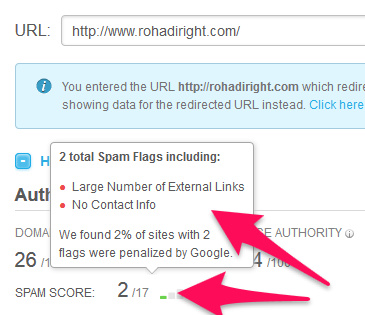
Nilai Spam Score minimal adalah 0/17 dan maksimal 17/17. Makin tinggi nilai spam score makin tinggi pula kemungkinan website tersebut dipakai untuk spam.
Dari pertanyaan-pertanyaan yang masuk ke fb saya dan diskusi-diskusi di forum lokal yang saya ikuti, sepertinya beberapa pemain SEO masih menggunakan metrik ini dalam menentukan kualitas expired domain.
Beberapa tutorial cara mencari expired domain yang saya temukan di Google juga menyarankan spam score harus direntang nilai tertentu.
Saya sendiri tidak menggunakan metrik spam score karena saya kurang cocok beberapa elemen-elemen on page yang dijadikan patokan seperti : ada tidaknya contact info, jumlah external link, adanya angka di nama domain dan sebagainya.
Jika Anda ingin menggunakan metrik Spam Score, pastikan Anda tidak mengikuti hasil yang diberikan 100%. Pengecekan histori domain secara manual tetap diperlukan.
Cara Mencari Domain Expired di ExpiredDomains.net
Terakhir, tidak lengkap rasanya membaca tutorial cara mencari domain expired tanpa mempraktekkannya langsung.
Dalam panduan ini, saya menggunakan expireddomains.net karena layanan ini gratis, jadi Anda bisa langsung praktek tanpa harus mengeluarkan biaya untuk subscription.
Untuk bisa menggunakan fitur-fitur di expireddomains.net secara maksimal, Anda harus register dulu.
Setelah Register & Login, Anda akan menemui menu-menu seperti dibawah ini :
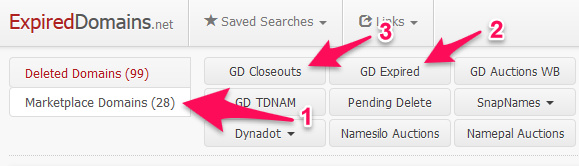
Untuk mencari jenis aged domain, klik Menu Marketplace Domain (no. 1) kemudian pilih GD Expired (No. 2).
GD Expired adalah tempat auction/lelang untuk domain yang baru saja expired (hari ke-26 s/d 35 dalam tabel tahapan domain expired diatas).
Atau Anda bisa memilih GD Closeouts (no. 3) jika Anda ingin mencari domain yang bisa langsung dibeli saat itu juga (BIN).
GD Closeouts adalah tempat lelang setelah domain tidak laku di lelang di GD Expired (hari ke-36 s/d 41 dalam tabel tahapan domain expired diatas).
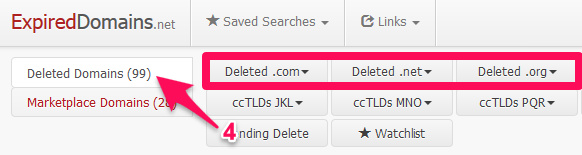
Sedangkan untuk mencari jenis dropped domain, klik Menu Deleted Domains (no. 4) kemudian pilih ekstensi domain yang Anda inginkan.
Setelah memilih diantara aged domain/dropped domain, selanjutnya adalah melakukan filter agar domain-domain yang muncul nantinya bisa sesuai dengan kriteria yang kita inginkan.
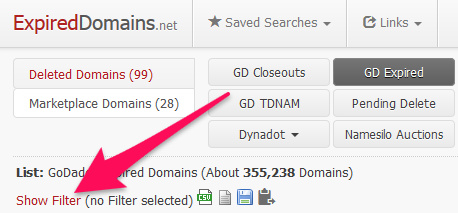
Untuk melakukan filter, klik �Show Filter� :
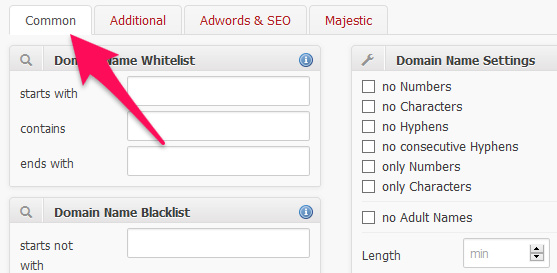
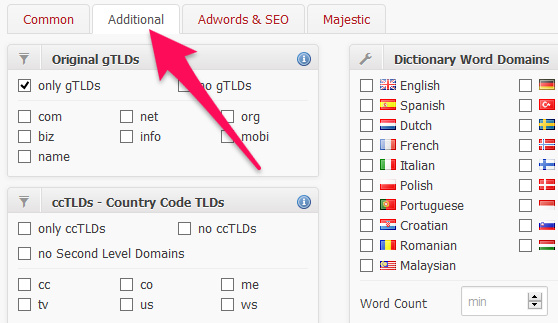
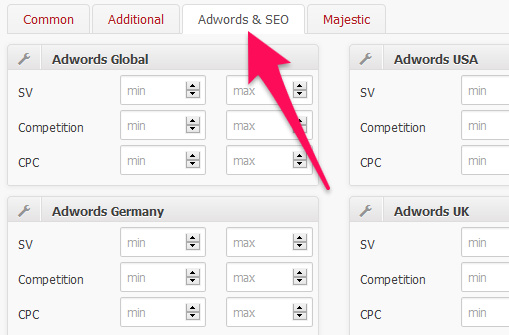
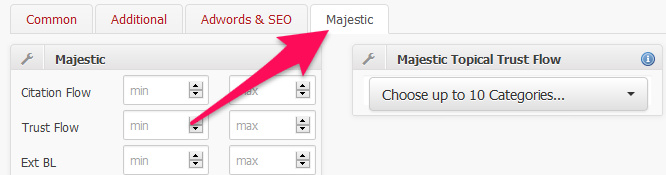
Ada 4 menu (tab) utama dalam filter ini yaitu Common, Additional, Adwords & SEO dan Majestic.
Tidak semua menu/filter harus Anda isi. Sesuaikan saja dengan kebutuhan.
Jika Anda mencari domain expired untuk PBN misalnya, maka filter Adwords hampir tidak ada gunanya untuk diisi.
Untuk lebih jelasnya, mari kita pelajari menu-menu tersebut satu persatu.
Tab Menu �Common�
Domain Name Whitelist
Filter ini digunakan untuk mencari domain berdasarkan keyword/kata tertentu.
Kecuali Anda ingin mencari domain jenis KOD, saya sarankan untuk mengosongi opsi ini.
Domain Name Blacklist
Berlawanan degan filter diatas, filter ini digunakan untuk tidak menampilkan domain-domain yang mempunyai keyword/kata tertentu.
Domain Name Contains � AND
Hampir sama fungsinya dengan �Domain Name Whitelist�, tapi disini Anda bisa memasukkan 2 keyword/kata atau lebih dan penempatannya tidak harus exact.
Misal Anda masukkan keyword �expired domain� (tanpa tanda petik) maka filter ini akan menampilkan domain-domain yang mempunyai keyword/kata �expired� dan �domain� seperti misal : expired123domain.com, domain07expired.com, dan sebagainya.
Domain Name (un) wanted Chars
Hampir sama fungsinya dengan �Domain Name Blacklist� tapi filter ini digunakan hanya untuk 1 karakter (1,2,3,A,B,C dan seterusnya).
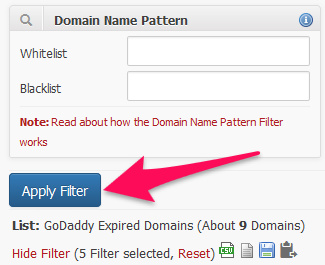
Domain Name Pattern
Filter ini digunakan untuk mencari domain yang namanya mempunyai pattern/pola tertentu.
Misal : awalan domain menggunakan konsonan (huruf mati BCDFGH), karakter kedua domain menggunakan huruf hidup (vowel AIUEO), karakter terakhir domain menggunakan angka dan sebagainya.
Kecuali Anda ingin mencari domain dengan nama yang sangat bagus dan brandable (yang kemungkinan harganya juga mahal) sebaiknya kosongi opsi ini.
Domain Name Settings
no Numbers : centang jika Anda tidak ingin menampilkan domain yang mempunyai angka. no Characters : centang jika Anda tidak ingin menampilkan domain yang mempunyai huruf alfabet. no Hyphens : centang jika Anda tidak ingin menampilkan domain yang mempunya tanda hubung (-). no consecutive Hyphens : centang jika Anda tidak ingin menampilkan domain yang mempunya tanda hubung berurutan (�). only Numbers : centang jika Anda hanya ingin menampilkan domain dengan angka (tanpa haruf alfabet atau karakter lain). only Characters : centang jika Anda hanya ingin menampilkan domain dengan huruf alfabet (tanpa angka atau karakter lain). no Adult Names : centang jika Anda tidak ingin menampilkan domain yang mempunyai keyword-keyword adult seperti s*x, bo*bs, p*rn, dan sebagainya.
Menu dibawahnya digunakan untuk mengatur batas minimal dan maksimal dari jumlah karakter, hyphens (tanda hubung), vowels (huruf hidup), consonants (huruf mati), characters/huruf alfabet dan Numbers (angka).
SimilarWeb Top Country
Filter ini digunakan untuk menampilkan domain-domain yang mempunyai peringkat di SimilarWeb.com (berdasarkan negara).
Common SEO
only with Dmoz Entry : centang jika Anda hanya ingin menampilkan domain yang masuk di directori Dmoz.org (yang sayangnya per 17 Maret 2017 telah ditutup).
only with SimilarWeb Rank : centang jika Anda hanya ingin menampilkan domain yang mempunyai ranking di SimilarWeb.com
only with Alexa Rank :centang jika Anda hanya ingin menampilkan domain yang mempunyai ranking di Alexa.com
only with Quantcast Rank : centang jika Anda hanya ingin menampilkan domain yang mempunyai ranking di Quantcast.com
Menu dibawahnya digunakan untuk mengatur batas minimal dan maksimal dari Backlink, ACR (Archive.org Number of Crawl Results), Alexa, WBY (Whois Birth Year) dan ABY (Archive.org Birth Year).
SimilarWeb
Filter ini digunakan untuk memfilter domain berdasarkan data dari SimilarWeb mulai dari ranking domain secara global (Global Rank), ranking domain per-negara (Top Country Rank), Trafik dan sebagainya.
Listing Settings
Filter ini digunakan untuk menampilkan domain berdasarkan data auction/lelang.
only new last 12 hours : centang jika Anda hanya ingin menampilkan domain yang masuk ke auction/lelang dalam 12 jam terakhir. only new last 24 hours : centang jika Anda hanya ingin menampilkan domain yang masuk ke auction/lelang dalam 24 jam terakhir. only new last 7 days : centang jika Anda hanya ingin menampilkan domain yang masuk ke auction/lelang dalam 7 hari terakhir. only new last 30 days : centang jika Anda hanya ingin menampilkan domain yang masuk ke auction/lelang dalam 30 hari terakhir.
Di menu bawahnya, Anda juga bisa menampilkan domain berdasarkan tanggal.
Max Price berfungsi untuk menentukan batas maksimal harga domain.
Listing Type untuk menentukan jenis auction/lelang yang ingin Anda tampilkan, apakah memakai sistem langsung beli (Buy it Now) atau sistem BID.
Domains per Page digunakan untuk mengatur jumlah domain per halaman yang ditampilkan di expireddomains.net.
Menu Tab �Additional�
Original gTLDs
Filter ini digunakan untuk menampilkan domain dengan ekstensi tertentu.
only gTLDs : centang jika Anda hanya ingin menampilkan domain yang termasuk dalam gTLDs (Generic Top-Level Domains) seperti .com, .net, .org, .biz, .info dan sebagainya.
no gTLDs : kebalikan dari opsi pertama diatas.
Di menu bawahnya, Anda juga bisa memilih untuk menampilkan domain .com saja, .net saja dan sebagainya.
ccTLDs � Country Code TLDs
Filter ini digunakan untuk menampilkan domain dengan ekstensi dari negara tertentu.
only ccTLDs : centang jika Anda hanya ingin menampilkan domain yang termasuk dalam ccTLDs (Country Code Top-Level Domains) seperti .uk (United Kingdom), .id (Indonesia), .es (Spain), .de (Deutschland/Germany) dan sebagainya.
no ccTLDs : kebalikan dari opsi pertama diatas.
no Second Level Domains : centang jika Anda tidak ingin menampilkan domain yang termasuk dalam Second Level Domains seperti .co.uk, .ac.uk, ac.id, sch.id, .com.au, .net.au, .co.at, .or.at dan sebagainya.
Di menu bawahnya, Anda juga bisa memilih untuk menampilkan domain dengan ekstensi .cc, .co, .me dan sebagainya.
Dictionary Word Domains
Filter ini digunakan untuk menampilkan domain dengan keyword/kata dari bahasa tertentu seperti English, German, Spanish, Indonesian (bahasa Indonesia) dan sebagainya.
Anda juga bisa mengatur berapa minimal dan maksimal dari keyword/kata yang ada dalam domain-domain tersebut.
Untuk filter lain di Menu Tab ini seperti Geo Domains, Name in selected TLD is available, Name in selected TLD is registered, Related Domains CNOBI, Related Domains CNO, Related Domains .COM dan Social Namecheck tidak akan saya jelaskan karena filter ini menurut saya tidak terlalu penting dalam mencari domain expired.
Menu Tab �Adwords & SEO�
Adwords Global, Adwords Germany, Adwords Products & Services Category, Adwords USA dan Adwords UK
Filter-filter ini sangat cocok digunakan untuk mencari domain expired untuk moneysite, utamanya untuk program Google Adsense.
Disini Anda bisa memfilter domain berdasarkan Global Monthly Search, Competition dan CPC (Cost per Click) yang ada di Adwords.
Yandex
Yandex TCI (Thematic Citation Index) adalah sistem perankingan website seperti Pagerank, tapi berdasarkan mesin pencari Yandex (Rusia).
Wikipedia & Wikipedia Databases
Gunakan filter ini jika Anda hanya ingin menampilkan domain yang mendapat backlink dari Wikipedia.
Majestic Million
Filter ini berdasarkan data dari Majestic SEO
Majestic Global Rank : centang jika Anda hanya ingin menampilkan domain yang mempunyai Global Rank di Majestic.
Di menu bawahnya Anda bisa mengatur batas minimal-maksimal jumlah backlink dari IP yang berbeda, jumlah backlink dari Class-C IP yang berbeda dan Ranking domain.
Hampir sama dengan Majestic Million, disini Anda juga bisa mengatur batas minimal-maksimal jumlah backlink dari IP yang berbeda, jumlah backlink dari Class-C IP yang berbeda dan jumlah total backlink.
Sama seperti Majestic Million, filter ini juga berdasarkan data dari Majestic SEO
Disini Anda bisa memfilter domain berdasarkan TF (Trust Flow), CF (Citation Flow), Jumlah External Backlinks (link keluar), Jumlah Referring Domains, Jumlah Backlink .edu/.gov, external backlink .edu/.gov dan sebagainya.
Majestic Topical Trust Flow
Filter ini adalah salah satu fitur andalan di Majestic.
Topical Trust Flow cukup berguna jika Anda ingin mencari expired domain dengan niche/topik tertentu.
Disini Anda bisa memilih sampai 10 kategori.
Langkah selanjutnya, jika Anda sudah selesai memilih filter yang dibutuhkan berdasarkan data-data diatas, Anda bisa klik �Apply Filter�.
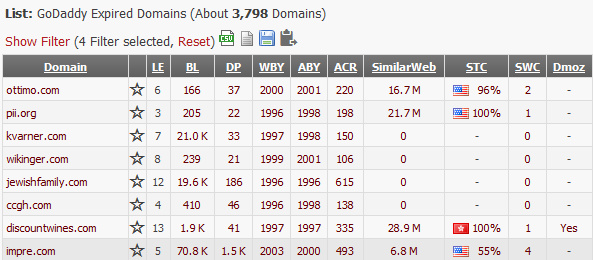
Maka domain-domain yang masuk kriteria akan ditampilkan beserta kolom-kolom yang berisi data-data pendukung seperti jumlah backlink, histori domain, harga domain, jenis auction, waktu berakhir auction dan sebagainya.
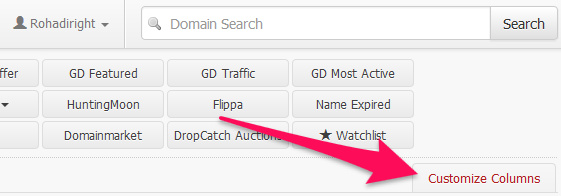
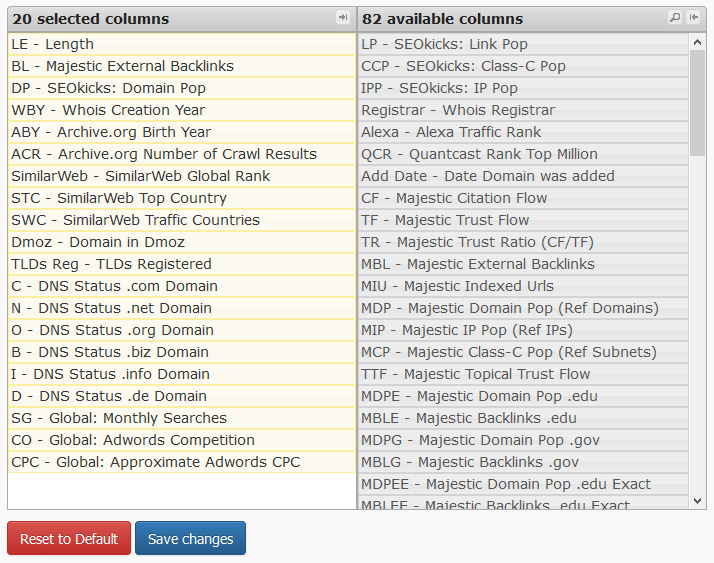
Anda juga bisa mengkustom kolom dari domain-domain yang ditampilkan ini berdasarkan kebutuhan.
Untuk melakukannya, klik �Show Filter� kemudian �Customize Columns�
Pilih kolom yang Anda perlukan kemudian klik �Save Changes�.
Jika sudah selesai, domain-domain ini bisa Anda simpan dalam bentuk .csv dan .txt agar bisa dianalisa lebih lanjut.
Kesimpulan
Untuk mencari domain expired yang berkualitas diperlukan analisa-analisa secara menyeluruh dan mendetail mulai dari kualitas domain, backlink, history dan sebagainya.
Tidak ada batasan minimal/maksimal yang pasti dari tiap metrik yang ada, jadi silahkan berimprovisasi sendiri agar menemukan komposisi yang cocok dan hasilnya sesuai dengan keinginan Anda.
Semakin Anda sering hunting expired domain, semakin terasah pula ketajaman Anda dalam mencari dan menemukan domain expired yang berkualitas, baik sebagai PBN maupun moneysite.
Semoga panduan ini bermanfaat. Jika ada pertanyaan jangan ragu untuk reply dikolom komentar :)